
TL; DR
Estimating what a workload will cost to run on Azure for a proposal, a funding request or a migration business case can take 20–30 minutes to a few hours per estimate, and it’s inconsistent if you just give it to an AI platform. I built a Claude skill that models Azure Consumed Revenue (ACR) by getting live pricing from the Azure Pricing API. Once the pricing has been downloaded, it outputs it to a workbook for auditability.
[Download it on GitHub here].
It currently covers VM and App Service compute costs, and I’ve validated the pricing and projection logic end-to-end, including a re-run that reproduced identical numbers and the workbook export. If you’ve got feedback or a better way to approach any of this, I’d love to hear it!
If you want the full story — including the three mistakes that cost the most time during setup — read on.
The Scenario
As a Solutions Architect, one question comes up constantly: how much will workload X, migration X, or project X cost to run in the cloud? This estimate usually enables the client to understand the cost of running the workload and enables the partner to put in a funding request based on an estimate (if relevant).
Depending on the size of the project this can take anywhere between 20–30 minutes to a few hours of using the relevant cost calculator (I will use Azure in this example).
The input is usually a spreadsheet provided by the client (an RVtools export for example) or a file that I create based on some provided/or estimated client specifications. The output is an export from a pricing calculator. Its mechanical work, and mechanical work is exactly what tends to go wrong when it’s done differently every time.
Do I really need a skill for this? What can already be done?
The input file can be fed into an AI platform currently (say ChatGPT or Claude) to get an Azure Consumed Revenue (ACR) estimate that can be used as an initial ballpark estimate, but really the end goal here is to try and provide a better quality and more consistent estimate. LLMs are non-deterministic, so each time you give the LLM the file it could use different assumptions or make basic mistakes (use A-series VMs for Production for example). This is where skills come in. Skills are structured, versioned and reusable and provide a way to do the task in a more consistent way.
The goal
The goal isn’t a fully final estimate from a single prompt — negotiated pricing, reservations, and edge-case sizing will always need human input. But getting the mechanical part — live pricing, consistent assumptions, a repeatable output — to roughly 90% ready is enough on its own to save real time.
The steps below are basic and don’t yet get to the point where you can give Claude a file as an input and get an output pricing file of sufficient quality. But this is the first step of the journey and given I can prompt Claude to provide outputs of sufficient quality, it’s only a matter of time before I can give it an input file.
Setup on Claude
I think it’s worth walking through my journey of setting this skill up on Claude, since it helps explain how the whole thing works.
Initially, I just prompted Claude to build the skill for me and called it acr-modeler. The idea was simple: take input details from the prompt, then pull live pricing from prices.azure.com. The catch is that Claude Desktop/Cowork runs itself as a virtual machine on your computer, effectively sandboxed - and that sandbox has no outbound internet access by default. Any attempt to hit an external API failed with a 403 Forbidden. Claude can reach a fixed set of allowed domains (things like GitHub and PyPI), but it doesn't have open internet access beyond that.
I considered adding prices.azure.com to the sandbox’s outbound allow-list so I could make the API calls. But that felt like the wrong fix — it’s not something that scales to every machine someone else might use this skill on, and I wasn’t even confident that allowing prices.azure.com alone would be enough to make the calls work.
That’s when it clicked that this was a good use case for an MCP server instead. An MCP server runs its own process and makes its own network calls, so it sidesteps the sandbox’s outbound restrictions entirely — no need to touch the allow-list on every machine that installs the skill.
I looked around for an existing Azure pricing MCP server and found one: AzurePricingMCP (full credit its creator and maintainer which are listed on its GitHub page).
MCP Server Setup
Getting the Azure Pricing MCP server working locally wasn’t totally plug and play either. I initially got the below error:
zsh: command not found: python
Turned out my Mac didn’t have python on the path at all. I installed it via Homebrew (brew install python@3.12), then built the venv pointing at that version directly (python3.12 -m venv .venv) rather than relying on a bare python command. From there, things worked.
Once I had it installed, I made sure to check it was running correctly.
I added the MCP server to Claude Desktop’s config file and then wanted to validate it worked with Claude.
Following a restart of Claude Desktop it did show up as a Connector!
A server showing up in Claude Desktop’s config doesn’t mean it’s visible in every chat — some tools stay “deferred” until explicitly searched for with tool_search before they’re callable. Once surfaced, it worked both when named directly and when inferred from a plain question with no tool mentioned.
Testing the MCP server
I then ran several prompts to test the MCP server and its tools and found a number of quirks that were useful to learn:
· App Service tiers need a space before the version letter. “P1 v3”, not “P1v3” — the tool returns zero results for the latter but suggests the correct name.
· VM results return every variant of a SKU as a separate row: Default (Linux), Windows, Spot, Low Priority. Windows reliably self-identifies here — the product name literally says “…Windows” — so the selection rule is straightforward: type == “Consumption”, exclude “Windows” from the product name, exclude “Spot”/”Low Priority” from the SKU name.
· App Service disambiguates OS the opposite way, and it will bite you if you reuse the VM rule. A P1 v3 search in East US returns two Consumption rows with the identical SKU name “P1 v3” — one at $0.315/hr, one at $0.155/hr. Neither product name contains the word “Windows.” Only the cheaper Linux row self-identifies, via a product name ending in “- Linux”; the Windows row is just the plain, unlabeled product name. Applying the VM rule here (exclude “Windows”) would match both rows and silently pick whichever came first — caught only because a smoke test happened to exercise this exact case and the numbers didn’t line up. The fix: for App Service, select by presence of “Linux” in the product name, not absence of “Windows.”
And there are probably a lot more of these waiting to be found as I refine this skill!
Rewiring the Skill’s Architecture
The fundamental fix: decouple the price-fetching from the math.
The initial script created by Claude was trying to fetch pricing directly. A subprocess launched from a script in the isolated VM (via the bash tool) cannot access the pricing API or MCP tools — only the assistant itself can. So, pricing can no longer be fetched inside a script.
The script doing the math -calculate_acr.py was rewritten to do only the projection math - compounding monthly growth rates, totalling across line items - on already-priced input. It makes zero network calls now.
The assistant’s job, per the updated SKILL.md, is now: call azure_price_search once per line item, apply the selection rules, write the resolved prices into a JSON file matching the new schema, then run the script on that file.
New input schema for calculate_acr.py:
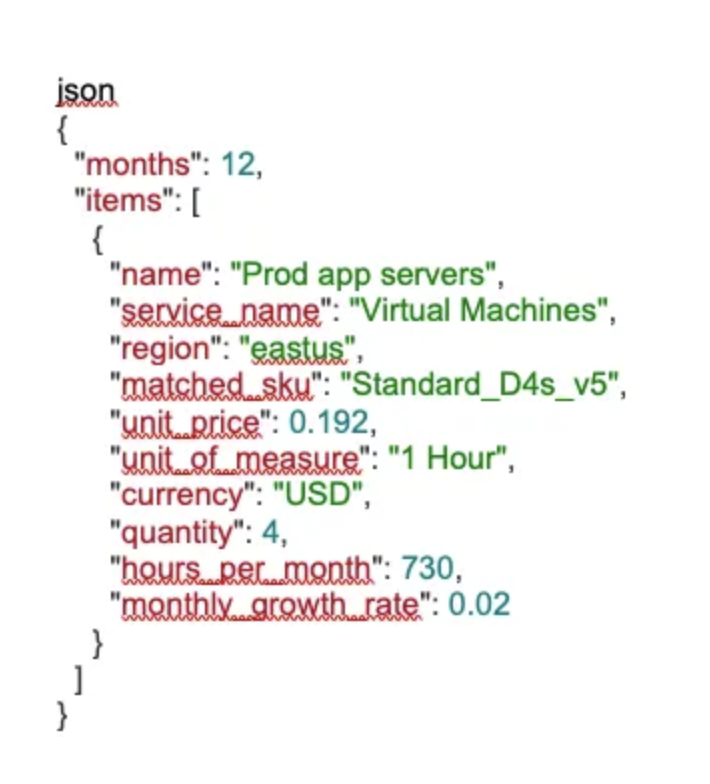
JSON Input Schema for calculate_acr.py
The workbook step (Inputs/Projection/Summary tabs) is now its own script, build_workbook.py, rather than an instruction Claude follows ad-hoc each time.
If a price can’t be resolved for an item, it’s included without unit_price (or with an error field) - the script flags it and excludes it from totals rather than silently costing it as zero. The aim of course is to have no such items as I refine this!
End-to-End Validation of the Skill
Two full runs, both using real live prices pulled fresh via the tool — nothing reused or hardcoded:
Test 1–4x Standard_D4s_v5 (East US, 2%/mo growth) + 2x App Service P1 v3 (East US, flat):
12-month ACR: $10,234.95
Note: how the skill has used Linux VMs here- I need to get it to list this assumption in the export file.
Test 2 (smoke test) — 6x Standard_D8s_v5 (West US 2, 1.5%/mo growth) + 3x App Service P2 v3 Linux (West US 2, flat), 24-month projection:
Month 1 run-rate: $2,360.82 → Month 24: $3,047.68
12-month ACR: $30,081.07 / 24-month ACR: $64,452.89
Next Steps
· Extend beyond VMs and App Service to other costs a real estimate would need — storage, network egress, backup, monitoring.
· Accept a structured input file directly (e.g. an RVTools-style export) instead of details typed into the prompt.
· Keep expanding the selection-rule test coverage as new services get added — each one seems to have its own quirks.
Code, SKILL.md, and both scripts are on GitHub at the link above. Feedback and PRs welcome.

Cover image